By Repli Team · June 29, 2026 · Guides
Quick Answer
A complete, beginner-friendly walkthrough for setting up comment-to-DM automation on Instagram with Repli — keyword triggers, Business account requirements, and
# How to Set Up Instagram Comment-to-DM Automation (2026 Step-by-Step Guide)
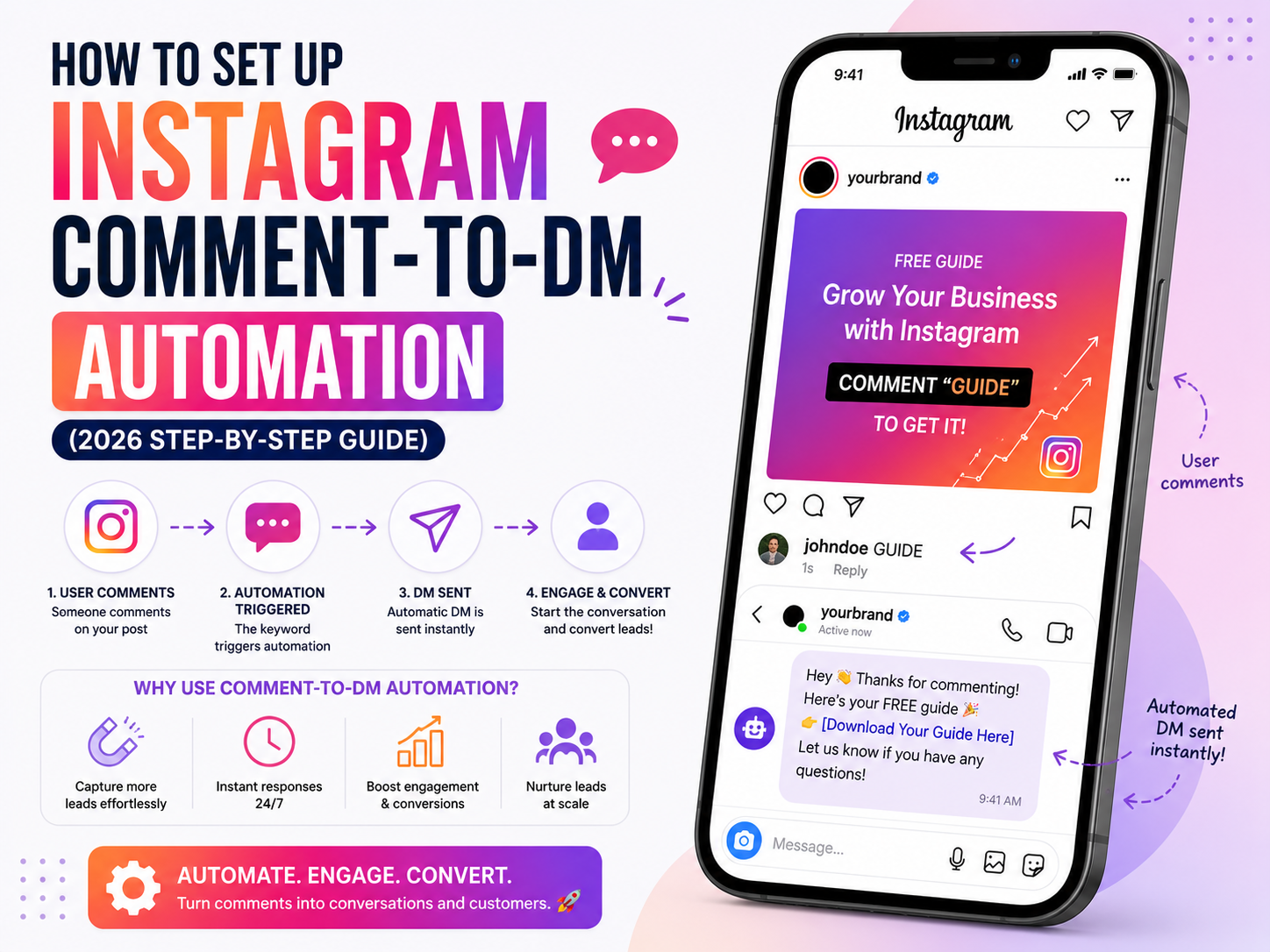
Comment-to-DM automation is one of the highest-converting workflows on Instagram. When a follower comments a keyword like "LINK" or "PRICE" on your post or reel, an automation instantly replies to their comment publicly **and** sends them a private DM with the link, lead form, or product info they asked for.
This guide walks you through setting it up end-to-end with [Repli](https://repli.in) in under 5 minutes — no code required.
## What You Need Before You Start
1. **An Instagram Business or Creator account.** Personal accounts cannot receive automated DMs via the Meta Graph API.
2. **An Instagram account connected to a Facebook Page** (Meta requirement for the messaging API).
3. **A free Repli account** at [repli.in](https://repli.in). The free plan includes 20 automated messages per day — plenty to test the flow.
> If your Instagram is still a Personal account, go to **Settings → Account type and tools → Switch to professional account** inside the Instagram app.
## Step 1 — Connect Instagram to Repli
1. Sign up at [repli.in](https://repli.in) and complete the short onboarding wizard.
2. Click **Connect Instagram**. You will be redirected to Instagram's official login screen.
3. Approve the requested permissions (manage messages, comments, basic profile data). Repli only requests scopes required to run the automation.
4. You will be redirected back to your dashboard with your Instagram profile picture and follower count visible — that confirms the connection is live.
## Step 2 — Create a Comment-to-DM Automation
1. From the dashboard, open **Automations → New automation**.
2. Choose the trigger **Comment on a post or reel**.
3. Select the post or reel you want the automation to run on (or choose **All posts** to run it across your whole feed).
4. Add your **keyword triggers** — the words people must comment to receive the DM. Good examples:
- `LINK`, `PRICE`, `INFO`, `BUY`, `SHOP`
- Add multiple keywords per automation. Repli matches them case-insensitively.
- Pro tip: set the wildcard `*` to reply to **every** comment regardless of keyword.
## Step 3 — Write the Public Comment Reply
When someone comments your keyword, Repli first replies publicly under their comment. Keep it short and inviting:
> "Sent! ✅ Check your DMs 💌"
This serves two purposes:
- It tells the commenter to check their inbox.
- The public reply signals to the Instagram algorithm that your post is generating engagement, which boosts reach.
## Step 4 — Build the Private DM
This is the message that lands in the user's inbox. With Repli you can include:
- **Text** — your offer, instructions, or a friendly intro.
- **Buttons** — up to three call-to-action buttons that open links (your store, booking page, lead form, WhatsApp, etc.).
- **Image** — a product photo, lookbook, or promo banner.
- **AI-powered reply (Pro+)** — let AI write the DM contextually based on the user's comment, your brand persona, and the post caption.
Example DM:
> Hey there 👋 thanks for commenting! Here's the link you asked for: https://yourstore.com/sale — use code **REPLI10** for 10% off your first order.
## Step 5 — (Optional) Require Follow
Toggle **Require user to follow you** to gate the DM behind a follow. Non-followers receive a short "Follow @youraccount and comment again to unlock the link" message. Followers receive the full DM instantly. This single setting typically grows follower count by 15–40% on viral reels.
## Step 6 — Save, Test, and Go Live
1. Click **Save automation** — it activates immediately.
2. Test it from a second Instagram account: comment your keyword on the selected post. You should see the public reply within seconds and a DM within ~10 seconds.
3. Watch results inside Repli's dashboard — each conversation is logged with the commenter's username, the keyword that triggered it, and the DM that was sent.
## Best Practices
- **Use specific keywords**, not generic ones. `PRICE` converts better than `HI` because the intent is clearer.
- **Always include the keyword in your caption or on the post image** ("Comment PRICE to get the link 👇"). Discovery is everything.
- **Respect Meta's 24-hour messaging window.** Automated DMs can only be sent in response to a recent user action.
- **Rotate keywords across posts** to avoid Instagram flagging repetitive behavior.
- **Free** users get Repli's "Sent free via repli.in" footer on outgoing DMs. Upgrade to Pro (₹499/mo) to remove it and unlock unlimited messages.
## Common Issues
| Issue | Fix |
| --- | --- |
| DMs not arriving | Make sure the Instagram account is Business/Creator and connected to a Facebook Page. |
| Public reply works but no DM | Re-authorize Repli — the `instagram_manage_messages` permission may have lapsed. |
| Automation runs on the wrong post | Re-select the target post in the automation editor. |
## Wrapping Up
Comment-to-DM automation is the single fastest way to convert reel views into qualified DM conversations — and Repli's free plan lets you launch it without paying a rupee. Set it up once, attach it to your next reel, and you'll start collecting leads and sales while you sleep.
[Start your free Repli account →](https://repli.in)
Frequently Asked Questions
What is How to Set Up Instagram Comment-to-DM Automation (2026 Step-by-Step Guide)?
A complete, beginner-friendly walkthrough for setting up comment-to-DM automation on Instagram with Repli — keyword triggers, Business account requirements, and
Is Repli free to use for Instagram automation?
Yes. Repli's free plan includes unlimited Comment-to-DM automations and 500 DM messages per month. No credit card required.
Is Repli safe for my Instagram account?
Yes. Repli uses the official Meta Graph API — Instagram's approved third-party automation interface. There is no screen-scraping and no risk of account suspension.
How much does Repli cost?
Free forever plan; Pro is ₹499/month, Pro+ is ₹999/month, and Pro Business starts at ₹2,999/month. Cancel anytime.
Does Repli work with WhatsApp too?
Yes. Repli supports the official WhatsApp Business Cloud API for AI replies, appointment booking, lead capture and template broadcasts.